Quick answer: Install Free Video Converter, add one local video, choose MP4 · H.264 and an output folder, then click Convert. Keep source resolution and frame rate for your first test. The free desktop app adds no product watermark and writes a separate output file.
Recommended starting settings
| Setting | Start here | Why |
|---|---|---|
| Everyday playback | MP4 · H.264 | A useful first result for compatible computers, phones and TVs. |
| Just the sound | MP3 audio | Choose an audio output instead of another video container. |
| Smaller file | Quality, bitrate or target size in Output settings | Pick one size/quality goal and check an encoded sample. |
| Trim or join | Edit / Trim, or Join files in the main queue | Make only the edits needed for the result. |
Before your first conversion
Use 64-bit Windows 11, or Windows 10 version 2004 or later, with Microsoft .NET Desktop Runtime 8 x64. Setup offers the official Microsoft runtime download if it is missing. Keep the complete application folder together; its bundled media tools are part of the program.
Allow space for the new output and, where needed, an optimized editing preview. Read the installer choices: RelevantKnowledge is a separate optional research application, and declining its offer still lets you install the converter.
Convert your first local video
Start with one short file before building a large queue. A simple conversion is easier to check than a batch with several different settings.
- Add the file with Video or drag it into the media queue. Check the displayed duration, dimensions and audio information.
- Choose MP4 · H.264 for a useful compatibility starting point. Keep source resolution and frame rate unless you have a reason to change them.
- Open Edit / Trim only if you need to cut, crop or adjust the recording. Apply the changes and return to the queue.
- Choose an output folder in Output settings, then click Convert. Open the result from the queue or Open output folder.
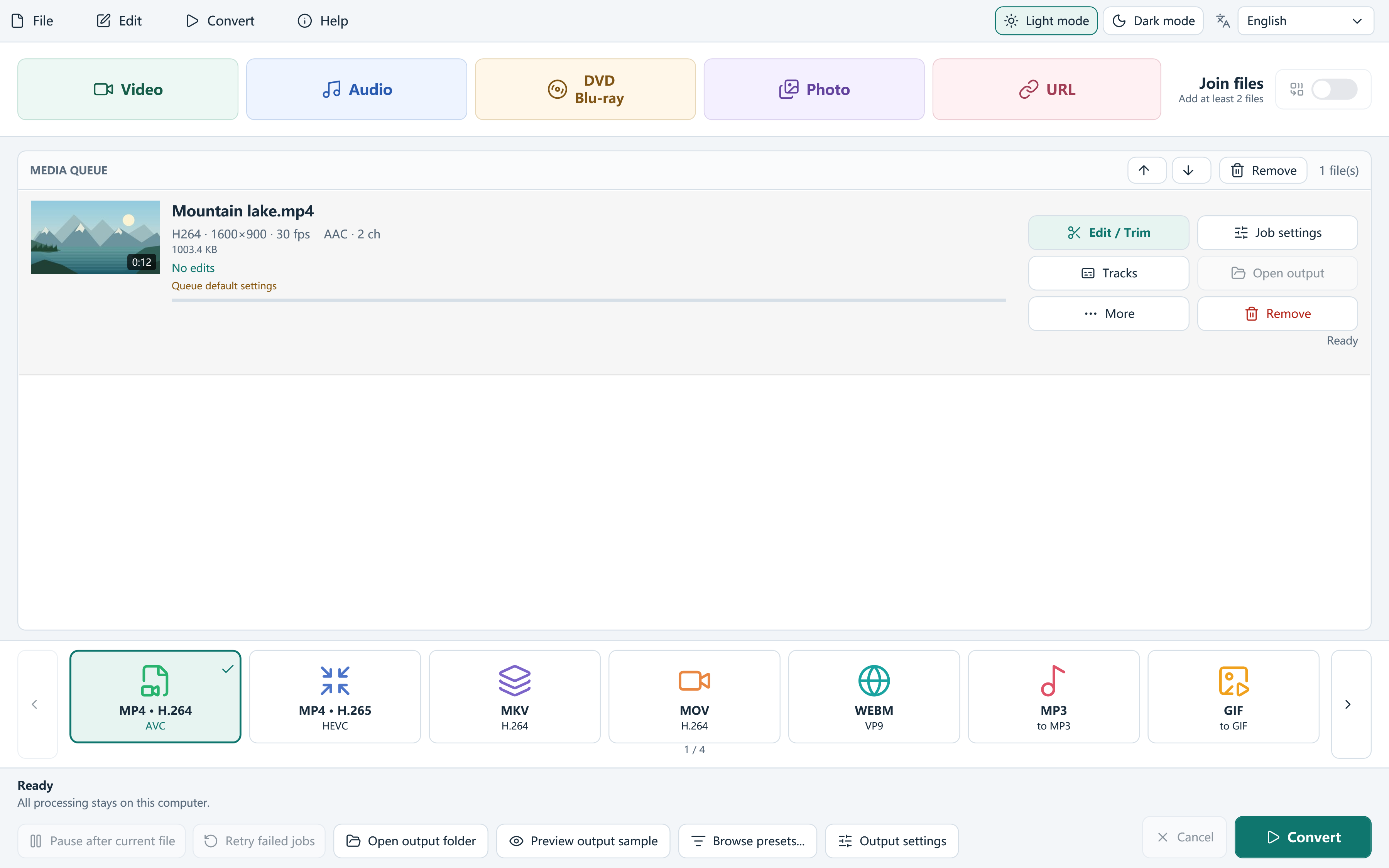
Choose the format for the destination
The file extension is only part of playback compatibility. MP4 is a container; H.264, HEVC and AV1 are different video codecs that can appear inside it. A phone or television must support the actual combination.
Use Browse presets for device, web, production and audio workflows. If you only want the soundtrack, choose an audio preset rather than a video file with an unfamiliar extension. Queue items can also have individual output settings.
Check the result, then reuse your setup
Local conversion runs on your PC without uploading your source media. Original files remain unchanged, and an occupied output name receives an available alternative. After conversion, play the beginning, middle and end; check sound, subtitles and orientation.
For longer jobs, Preview output sample encodes a short comparison using the current settings. Save a custom preset once the result suits your needs, and save a project when you want to return to the queue later.
Frequently asked questions
Is this a Windows 11-only app?
No. This release also targets Windows 10 version 2004 or later, x64. The same .NET Desktop Runtime 8 requirement applies.
Does the free converter add a watermark?
The app adds no product watermark. A PNG watermark appears only when you choose to add your own image.
Can I add a YouTube link instead of a file?
Yes, for supported public media you are permitted to use. Read formats, choose an input quality and add the source. Its media downloads when Convert starts.